
Expense Tracking for Canadian Businesses
Track business expenses with CRA-ready categories. Include expenses in client invoices and generate tax-ready reports. All with automatic GST/HST handling.
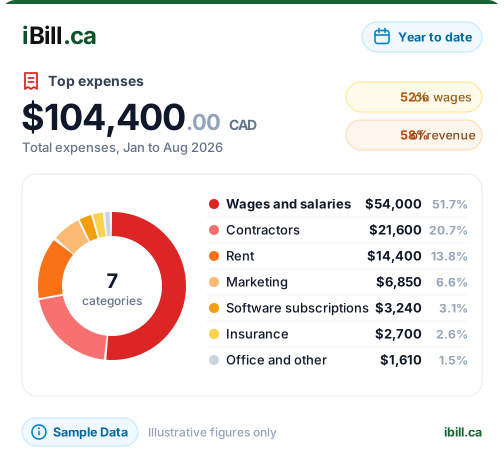
Everything You Need to Track Business Expenses
Simple, powerful expense tracking built right into your invoicing software
Quick Expense Entry
Add expenses in seconds. Enter amount, select category, add description. Optionally link to a client or project for easy invoicing later.
CRA-Ready Categories
Pre-configured expense categories that match CRA requirements. Office supplies, travel, vehicle, meals, professional fees, and more.
Include in Invoices
Billable expenses can be included in client invoices with one click. Perfect for reimbursable project costs, travel, and materials.
Receipt Uploads
Attach receipt photos or PDFs to expenses. Keep everything organized for CRA record-keeping requirements. Never lose a receipt again.
Expense Reports
Generate reports by category, date range, client, or project. Export to CSV for your accountant. Perfect for tax time and financial planning.
Project-Based Tracking
Link expenses to specific projects. See total project costs including time and expenses. Bill clients accurately for all project-related costs.
CRA-Ready Expense Categories
Pre-configured categories that match CRA tax deduction requirements
How It Works
From receipt to tax deduction in 4 simple steps
Why Use iBill for Expense Tracking?
More than just a spreadsheet
How to Track Business Expenses Properly
Expense tracking fails for one of two reasons: the system needs more discipline than anyone sustains past month three, or the records captured are not enough to support the deduction. Both are avoidable.
Capture at the moment you spend
The realistic failure is not choosing the wrong tool — it is choosing one that depends on a shoebox and a free afternoon in January. Photograph the receipt when it is handed to you. Thermal receipts fade to blank within a couple of years, so a photo taken at the till is often the only version that still exists at tax time.
What each expense record needs to show
A bank statement line proves money left your account. It does not prove what you bought or how much tax you paid, and that difference is what separates a supported claim from a disallowed one. To claim an input tax credit, the documentation you need scales with the purchase:
- Under $100 — supplier name, the date, and the total amount paid
- $100 to $499.99 — the above, plus the supplier's GST/HST registration number and the tax charged (or a statement that tax is included)
- $500 and over — the above, plus your name, the terms of payment, and a description of what was supplied
Records must be kept for six years from the end of the last tax year they relate to — not six years from the date on the receipt. For a December year-end, a receipt from March 2026 needs keeping until the end of 2032. Full record-keeping rules ›
Categorise as you go, not at year end
Categorising 400 transactions in one sitting is where accuracy dies — nobody remembers what a $47 charge from eight months ago was for. iBill ships with Canadian expense categories built in: Advertising, Bank Fees, Insurance, Meals & Entertainment, Office Supplies, Professional Services, Rent, Repairs & Maintenance, Software & Subscriptions, Sponsorship & Promotion, Subcontractors, Telecommunications, Travel, Utilities, and Vehicle costs — each mapped to the right account in your books so your reports are correct without a second step.
Keep vehicle costs separate
Vehicle expenses are claimed one of two ways, and mixing them causes problems. A per-kilometre allowance for 2026 is 73¢ for the first 5,000 km and 67¢ after that, which requires a log of business kilometres rather than fuel receipts. Actual-cost claims need the receipts and a business-use percentage. Pick one method and keep the supporting records that method requires.
Expense management, not just expense capture
Capturing a receipt is the start. Managing expenses means knowing what you have spent by category this quarter, which costs are billable to a client and have not been invoiced yet, and what your actual profit is once expenses are counted. That last one matters more than it sounds: a business tracking revenue but not costs is reading its profit as though every dollar invoiced were kept.
Because iBill keeps proper double-entry records underneath, every expense you record flows straight into your income statement, your balance sheet and your sales tax report — so a business expense report for your accountant is a filter and an export, not a rebuild.
Bill expenses back to the client
Costs incurred on a client's behalf are the ones most often forgotten, because they are recorded as expenses and then never make it onto an invoice. Link an expense to a client or project when you record it, and it stays visible as unbilled until it is either invoiced or written off.
Frequently Asked Questions
Start Tracking Your Expenses Today
Try iBill.ca's expense tracking for your Canadian business.