
General Ledger Software — Every Transaction, Automatically Recorded
iBill's general ledger captures every invoice, payment, expense, and refund with sequential entry numbers and full audit trail. The foundation of your accounting.
What is a General Ledger?
The complete record of every financial transaction in your business — and iBill builds it automatically
The Complete Financial Record
A general ledger (GL) is the master record of all financial transactions in your business. Every dollar that flows in or out is recorded here with a date, amount, account classification, and description. It is the single source of truth for your financial data.
Journal Entries Flow into the GL
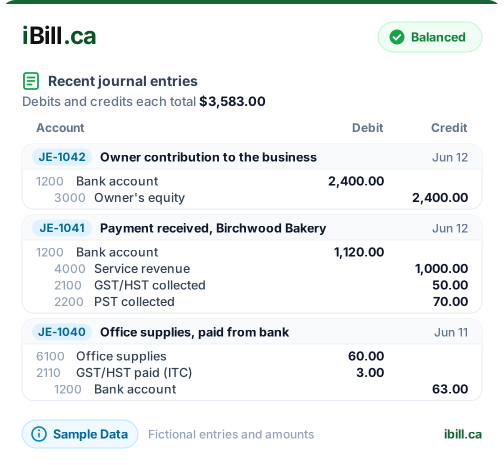
Every financial event creates a journal entry with balanced debits and credits. These entries are posted to the general ledger, where they accumulate by account. A payment creates a debit to your bank account and a credit to revenue — both sides always balance.
Foundation of Financial Reporting
Your balance sheet, income statement, and trial balance are all generated directly from the GL. Account balances on those reports are simply the sum of all journal entries posted to each account. Without a proper GL, financial statements cannot be produced.
iBill Automates It All
With iBill, you never manually post to the GL. Every payment, expense, refund, mileage log, and asset acquisition triggers an automatic journal entry. The GL is always current, always balanced, and always ready for reporting or CRA review.
Automated GL Posting Events
Every financial event triggers balanced journal entries — no manual posting required
| Financial Event | Debit (DR) | Credit (CR) |
|---|---|---|
| Payment Recorded | 1200 Bank | 4000 Revenue + Tax |
| Advance Payment | 1200 Bank | 2400 Unearned Revenue |
| Refund Issued | 4000 Revenue + Tax | 1200 Bank |
| Expense Created | Expense + 2110 ITC + 2220 PST | 1200 Bank |
| Mileage Logged | 6600 Vehicle Expense | 1200 Bank |
| Asset Acquired | 1600 Capital Assets | 1200 Bank |
| CCA Depreciation | 6900 Depreciation | 1610 Accum. Depreciation |
Key GL Features
Everything you need to manage, search, and export your general ledger data
Searchable Transaction History
Find any entry by account, date, or reference number. Quickly locate specific transactions across thousands of GL entries with powerful search and filtering.
Filter by Account
View all entries for a specific GL account — bank, revenue, expenses, tax liabilities, or any other account in your chart of accounts. Isolate exactly what you need.
Drill-Down Views
Click any summary balance to see the underlying journal entries that compose it. Trace any account balance back to the individual transactions that created it.
Bank Reconciliation
Match GL entries to bank statement transactions. Identify discrepancies, auto-categorize recurring items, and keep your books aligned with your bank. Learn more about double-entry accounting.
Sequential Entry Numbers
Every journal entry receives a sequential, tamper-evident entry number. This numbering scheme creates a verifiable audit trail that satisfies CRA record-keeping requirements.
Export to CSV/Excel
Download your GL data in CSV or Excel format to share with your accountant, import into other systems, or create custom reports. Full transaction detail included in every export.
Your Complete Financial Record — Automated
Every payment, expense, and refund posted to your general ledger automatically. No manual entry, no missed transactions.
Get Started NowRefund Management with Automatic Tax Reversals
Process full or partial refunds and the GL handles proportional tax calculations for CRA compliance
- Full refunds reverse the entire payment and all associated taxes in the GL
- Partial refunds calculate proportional tax reversals automatically (e.g., 50% refund = 50% GST, HST, PST, QST reversed)
- Invoice status updates to "Refunded" or "Partially Refunded" with remaining balance tracked
- Refund reason tracking for audit documentation
- CRA-ready refund reports with detailed tax breakdowns exportable in CSV, Excel, or PDF
Partial Refund Example (50%)
Proportional Tax Reversal
Select Payment
Choose the original payment to refund
Enter Amount
Full or partial with refund reason
Auto Calculate
Tax reversal computed proportionally
GL Updated
Ledger, status, and balances sync
Dual-Ledger Architecture
iBill maintains two synchronized ledger systems for maximum reliability and accuracy
Legacy Payment Ledger
Tracks every payment, refund, and credit in a simple single-entry format. Powers the Ledger Dashboard and generates data for CRA tax reports. Fast, reliable payment history.
GL Journal Entries
Full double-entry accounting with balanced debits and credits. Powers the Accounting Dashboard, balance sheet, income statement, and trial balance. Complete audit trail.
Automatic Cross-Checking
Both ledgers stay in sync automatically. iBill cross-checks 8 balances — AR, Revenue, Expenses, Bank, GST/HST, PST, QST, and ITC — to verify consistency between the two systems.
General Ledger FAQs
Ready to see your complete financial record?
Create AccountEvery Dollar, Every Transaction — Automatically Tracked
Trusted by Canadian businesses using iBill's general ledger.
Create AccountUnlimited Invoices • CRA-Ready