
Income Statement Software — Profit & Loss Report
Your income statement generates automatically from GL entries. See revenue, expenses, and net income by period. Revenue shown when paid (cash basis).
What is an Income Statement?
An income statement (also called a profit and loss report) shows your revenue, expenses, and net income over a specific period
Revenue (GL 4000)
Revenue is the income your business earns from providing goods or services. iBill's Profit and Loss report shows revenue when payment is received, matching the general ledger, which posts revenue at payment date. The dashboard revenue tile counts invoices when issued, including sent and unpaid invoices. Your tax preparer determines which basis applies to your filing.
Expenses (GL 5000-6900)
Expenses are the costs of running your business. iBill tracks expenses across multiple GL accounts: Office Supplies (5300), Rent (5400), Utilities (5500), Insurance (5600), Vehicle Expenses (6600), and Depreciation (6900). Each expense reduces your net income and is deductible for tax purposes when properly categorized.
Net Income
Net income is the bottom line: Revenue minus Expenses. A positive number means your business is profitable for the period. Net income flows into Retained Earnings on your balance sheet, connecting your two core financial statements. This is the figure you report to the CRA on your tax return.
Income Statement Features
Everything you need to generate, analyze, and export your profit and loss report — powered by your general ledger
Auto-Generated from GL
Your income statement is generated directly from your general ledger journal entries. Every payment received, expense logged, mileage recorded, and depreciation calculated flows into the correct revenue or expense account — no manual data entry needed.
Period Filtering
Generate your income statement for any date range: monthly, quarterly, annually, or custom dates. Compare performance across periods to spot trends, prepare for tax season, or provide your accountant with exactly the report they need.
Revenue by Category
See your revenue broken down by GL account. Service Revenue (4000) shows income from paid invoices. If you receive advance payments, those are tracked separately in Unearned Revenue (2400) until the work is completed — keeping your income statement accurate.
Expense Breakdown
Every expense is categorized by GL account: Office Supplies (5300), Rent (5400), Utilities (5500), Insurance (5600), Professional Fees (5700), Vehicle Expenses (6600), and CCA Depreciation (6900). You see exactly where your money goes each period.
Cash-Basis Profit and Loss
Your Profit and Loss report shows revenue when payment is received; the dashboard counts revenue when an invoice is issued. Sales tax timing follows the Excise Tax Act s.168 rule (earlier of invoice date or payment date). Your tax preparer determines which filing basis applies.
Export to PDF & Excel
Export your income statement to a professional PDF for your accountant, banker, or CRA filing. Or export to Excel for custom analysis, budgeting, and year-over-year comparisons. Both formats include the full account-level detail.
See Your Profit and Loss Instantly
Every payment and expense flows into your income statement automatically. No spreadsheets, no manual calculations.
Get Started NowIncome Statement Example
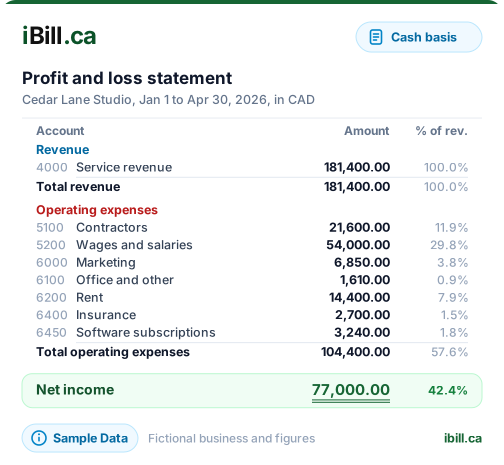
A sample profit and loss report showing revenue, expenses, and net income for a period
Sample Business — Income Statement
For the period January 1 – February 18, 2026
Basis: iBill's Profit and Loss report shows revenue when payment is received; the dashboard counts revenue when an invoice is issued. Sales tax follows ETA s.168 timing (earlier of invoice or payment date). Your tax preparer decides whether to file on a cash or accrual basis.
Canadian Standards for Income Statement Preparation
Understanding ASPE requirements and CRA reporting rules ensures your income statement meets professional and regulatory standards.
ASPE Section 1520: Income Statement Presentation
For private enterprises following Accounting Standards for Private Enterprises (ASPE), Section 1520 governs how the income statement must be presented. While sole proprietors and unincorporated businesses are not strictly required to follow ASPE, understanding these standards helps produce professional financial statements that banks, investors, and the CRA take seriously.
ASPE Section 1520 requires the income statement to present, at minimum: revenue, cost of goods sold (if applicable), gross profit, operating expenses by nature or function, operating income, other income and expenses (such as interest income or foreign exchange gains/losses), income tax expense (for corporations), and net income. Each material category must be presented as a separate line item -- you cannot lump significantly different expense types together.
Revenue Recognition for Canadian Businesses
How and when you recognize revenue on your income statement depends on your accounting method:
- Cash basis (available for income tax only to farmers, fishers and self-employed commission agents) -- Revenue is recognized when payment is received, not when the invoice is issued. If you send an invoice in December 2026 but receive payment in January 2027, the revenue belongs to the 2027 tax year. Your tax preparer determines whether cash basis applies to your filing.
- Accrual basis (generally required by the CRA for business income; also how the iBill dashboard counts revenue) -- Revenue is recognized when earned, regardless of when payment is received. Under ASPE Section 3400, revenue from the sale of goods is recognized when the significant risks and rewards of ownership are transferred, the amount can be reliably measured, and collection is reasonably assured.
- Retainer and milestone billing -- If you bill in advance (retainers), revenue should be recognized as the work is performed, not when the retainer is received. The unearned portion is recorded as a liability (Unearned Revenue) on your balance sheet.
Expense Categorization for Canadian Businesses
Proper expense categorization on your income statement directly affects your tax filing. The CRA's T2125 form (Statement of Business or Professional Activities) requires expenses to be reported in specific categories. Aligning your income statement categories with T2125 lines saves time and reduces errors during tax preparation:
Cost of Goods Sold
Direct costs of producing goods or delivering services: materials, subcontractor labour, freight-in. Reported on T2125 Line 8320. Separating COGS from operating expenses shows your true gross margin.
Salaries & Wages
Employee compensation, CPP/EI employer contributions, benefits. T2125 Line 8340. Does not include owner draws in a sole proprietorship -- those are equity distributions, not expenses.
Rent & Occupancy
Office or workspace rent, property tax, utilities for commercial space, common area maintenance. T2125 Line 8910. Home office expenses use a separate calculation (Form T2125, Part 7).
Professional Fees
Accounting, legal, bookkeeping, and consulting fees. T2125 Line 8860. These must be actual amounts paid (cash basis) or invoiced (accrual basis) during the fiscal period.
Vehicle Expenses
Gas, maintenance, insurance, licence fees, lease payments for business vehicles. T2125 Line 9281. Must prorate between business and personal use based on a detailed mileage log.
Capital Cost Allowance
Depreciation on capital assets (equipment, vehicles, computers). Reported separately on the CCA schedule attached to T2125. Not the full purchase price -- the annual CCA deduction based on the asset's class and rate.
Multi-Step vs. Single-Step Income Statement
There are two standard formats for presenting an income statement. The right choice depends on your business complexity:
Single-step format lists all revenue in one section and all expenses in another, then calculates net income in a single subtraction. This format is simpler and works well for service-based businesses with no inventory. It groups all expenses together regardless of whether they are operating expenses, interest expenses, or other costs.
Multi-step format separates revenue and expenses into operating and non-operating categories, showing intermediate subtotals like gross profit and operating income. This format provides more insight into where your money is made and spent. For businesses that sell products, the multi-step format shows: Revenue minus Cost of Goods Sold equals Gross Profit, then Gross Profit minus Operating Expenses equals Operating Income, and finally Operating Income plus/minus Other Income/Expenses equals Net Income.
iBill generates a multi-step income statement automatically from your general ledger, grouping revenue accounts (4000 series), cost of sales (5000 series), operating expenses (6000-7000 series), and other income/expenses into their respective sections.
How the Income Statement Feeds Into Your Tax Return (T2125)
For sole proprietors and partnerships, the income statement is the primary source document for completing CRA Form T2125 (Statement of Business or Professional Activities), which is filed as part of your personal T1 tax return. The mapping is direct:
- Gross sales/revenue from your income statement flows to T2125 Line 8000.
- Cost of goods sold flows to Lines 8300-8519.
- Each expense category maps to a specific T2125 line (advertising to 8520, meals to 8523, vehicle to 9281, etc.).
- Net income (or loss) from T2125 flows to Line 13500 of your T1 personal tax return, where it is combined with employment income, investment income, and other sources.
- GST/HST collected and paid are not expenses on the income statement -- they flow separately to your GST/HST return. However, PST or RST paid in Saskatchewan, Manitoba, or BC is an expense because it cannot be recovered as an input tax credit.
Maintaining an accurate income statement throughout the year means your T2125 practically fills itself at tax time, and your accountant spends less time (and charges you less) preparing your return.
Income Statement FAQs
Ready to see your profit and loss in real time?
Create AccountSee Your Profit and Loss Instantly
Trusted by Canadian businesses using iBill's accounting tools.
Create AccountUnlimited Invoices • CRA-Ready