
Vendor Bill Management — Accounts Payable Tracking
How Vendor Bills Work in iBill
Enter a vendor bill iBill automatically posts DR Expense / CR Accounts Payable (GL 2000). When you pay, it posts DR AP / CR Bank (GL 1200). Accrual-basis — expenses recognized when billed, not when paid. AP aging report
Track every vendor bill from receipt to payment. iBill handles the double-entry GL posting automatically so your accounts payable balance is always accurate.
What Are Vendor Bills?
Vendor bills are invoices you receive from suppliers. They represent money your business owes — your accounts payable.
Accounts Payable (AP)
Accounts payable is the total amount your business owes to vendors and suppliers. When you enter a vendor bill in iBill, it automatically creates an AP liability on GL account 2000. This gives you an accurate, real-time view of your outstanding obligations without manual tracking.
Accrual-Basis Recognition
iBill uses accrual-basis accounting for vendor bills. The expense and AP liability are recognized the moment the bill is entered — not when you pay. This follows CPA Canada guidance for micro-businesses and gives you an accurate picture of what you owe at any point in time.
Payment Tracking
When you record a payment against a vendor bill, iBill posts a GL entry (DR Accounts Payable 2000 / CR Bank 1200) and updates the bill status to paid. Track partial payments, view outstanding balances, and see full payment history for every vendor.
Vendor Bill Management Features
Everything you need to manage vendor bills, track payments, and monitor accounts payable
Vendor Bill CRUD
Create, view, edit, and delete vendor bills with full line-item detail. Enter the vendor name, bill number, date, due date, expense category, and amount. iBill stores all bill data and links it to the correct vendor for easy lookup and reporting.
Automatic GL Posting
Every vendor bill automatically generates a double-entry journal entry: DR Expense (the relevant expense account) / CR Accounts Payable (GL 2000). No manual journal entries needed. Your general ledger and financial statements stay accurate in real time.
Payment Tracking
Record payments against vendor bills individually. When you pay a bill, iBill posts DR Accounts Payable (GL 2000) / CR Bank (GL 1200) and marks the bill as paid. View payment history, outstanding balances, and total amounts paid per vendor.
AP Aging Report
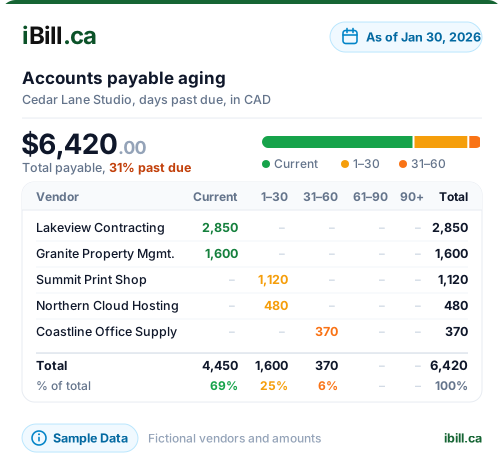
See all outstanding vendor bills grouped by age: Current (0-30 days), 31-60 days, 61-90 days, and 90+ days overdue. Prioritize which bills to pay first, avoid late fees, and maintain strong vendor relationships. Generated automatically from your bill data.
Vendor Payment History
View a complete payment history for each vendor. See every bill received, amounts paid, outstanding balances, and average payment terms. This helps you negotiate better terms with reliable suppliers and identify vendors with consistently late billing.
Export to PDF & Excel
Export your vendor bills, payment records, and AP aging reports to PDF or Excel. Share with your accountant, attach to tax filings, or keep for your records. All exports include full vendor details, amounts, dates, and payment status.
Track Every Vendor Bill Automatically
Enter a bill, iBill posts the journal entry. Record a payment, iBill clears the AP. No spreadsheets.
Get Started NowHow iBill Posts Vendor Bills to the GL
A real example showing the automatic journal entries when you enter and pay a vendor bill
Example: $2,500 Office Supplies Bill from Vendor
Bill received March 1, 2026 — Paid March 15, 2026
Accrual-basis accounting: The expense is recognized on March 1 when the bill is received, not March 15 when it is paid. This gives you an accurate picture of obligations at any point in time. The AP balance correctly shows $2,500 owed between March 1-14, then $0 after payment.
AP Aging Report
See all unpaid vendor bills grouped by how long they have been outstanding
| Vendor | Bill Amount | Due Date | Age |
|---|---|---|---|
| Office Supply Co. | $1,250.00 | Mar 20, 2026 | Current |
| Web Hosting Inc. | $89.99 | Mar 5, 2026 | Current |
| Print Services Ltd. | $475.00 | Feb 10, 2026 | 31-60 days |
| Tech Repairs Corp. | $2,100.00 | Jan 15, 2026 | 61-90 days |
| Total Outstanding | $3,914.99 |
Vendor Bill Management FAQs
Ready to take control of your accounts payable?
Create AccountTrack Vendor Bills Automatically
Trusted by Canadian businesses using iBill's accounts payable tools.
Create Account• Accrual-Basis AP