
What Must Be on a CRA-Ready Invoice?
The Canada Revenue Agency (CRA) has specific requirements for invoices, especially if you're registered for GST/HST. Meeting these requirements ensures your clients can claim input tax credits and keeps you ready during audits.
Essential CRA Invoice Requirements
- Your Business Name - Legal name or operating/trade name
- Business Address - Full mailing address
- GST/HST Registration Number - 15-character number (if registered)
- Invoice Date - When the invoice was issued
- Unique Invoice Number - Sequential numbering recommended
- Client/Customer Information - Name and address of the buyer
- Description of Goods/Services - Clear description of what was sold
- Quantity and Unit Price - For each item or service
- Tax Amounts Shown Separately - GST, HST, PST, or QST as line items
- Total Amount Due - Including all taxes
- Payment Terms - Due date and accepted payment methods
iBill Handles All 11 CRA Requirements Automatically
Every invoice includes your GST/HST number, proper tax breakdowns, and all required fields. No manual checklist needed.
Create InvoiceGST/HST Registration Number Requirements
Your GST/HST registration number is a 15-character Business Number (BN) that looks like this: 123456789RT0001
- The first 9 digits are your Business Number
- "RT" indicates it's for GST/HST purposes
- The last 4 digits identify the specific account
How to Show Taxes on Your Invoice
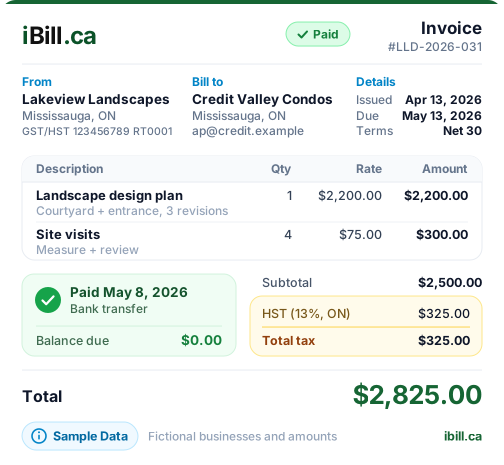
CRA requires that tax amounts be shown separately on invoices. This is crucial for your clients to claim input tax credits. Here's an example of a properly formatted invoice:
Tax Display by Province
Different provinces require different tax displays:
- Ontario, New Brunswick, Nova Scotia, PEI, NL: Show HST as a single line (calculate Ontario 13% HST)
- British Columbia, Manitoba, Saskatchewan: Show GST and PST as separate lines (BC PST calculator)
- Quebec: Show GST and QST as separate lines — QST is 9.975% on subtotal only, since 2013 (Quebec QST calculator)
- Alberta, NWT, Nunavut, Yukon: Show GST only — no provincial tax (GST/HST calculator for all provinces)
How Long to Keep Invoices
CRA requires you to keep all invoices and supporting documents for at least 6 years from the end of the tax year they relate to. This applies to both invoices you issue and invoices you receive.
How to Create a CRA-Ready GST Invoice
Follow these steps to create invoices that meet all CRA requirements:
Step 1: Confirm Your GST/HST Registration
Ensure you are registered with the CRA and have a valid GST/HST number before charging tax. If your business earns more than $30,000 annually, you are required to register.
Step 2: Set Up Your Business Profile
- Enter your business name, address, and GST/HST registration number
- Add your client with their address and province
- iBill.ca automatically applies the correct tax rate based on the client's province
Step 3: Create the Invoice
- Enter invoice number, date, and due date
- Add items or services with quantity, rate, and subtotal
- iBill.ca automatically calculates the applicable taxes
Step 4: Verify Required Fields
- Display your GST/HST number clearly on the invoice
- Show the tax amount separately (e.g., "GST 5% $25.00")
- Include subtotal, tax breakdown, and total payable
- Ensure business and client information are complete
Step 5: Send and Track
- Email or download the invoice directly from iBill.ca
- Keep copies for your records and CRA reporting
- Track payment status in your dashboard
Skip the Manual Work — iBill Does It Automatically
Every invoice includes your GST/HST number, proper tax breakdowns, and all required fields. No manual checklist needed.
Create InvoiceGST/HST Filing Frequency
How often you file depends on your annual revenue:
CRA Record-Keeping Requirements
The CRA requires you to keep all business records -- including invoices you issue and receive -- for at least 6 years from the end of the tax year they relate to. For a complete breakdown of what to keep and for how long, see our guide on record-keeping for Canadian taxes.
- Year 1 (Current): Active records — invoices, receipts, contracts, bank statements for day-to-day operations and tax filing
- Years 2-6 (Retention): Mandatory retention — all sales invoices, purchase invoices, payroll records, contracts, and supporting documents
- Year 7+ (Archive): Safe to destroy unless CRA has contacted you about a review, audit, or appeal
CRA Penalties for Non-Compliance
Non-compliance can be costly. Here's what to watch out for:
- Incomplete invoices: Missing required fields can result in your clients being denied input tax credits and may trigger audits
- Late filing: Penalties of 1% of amount owing plus 0.25% for each month late (up to 12 months), plus daily compound interest
- Incorrect tax collection: Charging the wrong rate means you owe the uncollected tax plus penalties and interest
- Poor record-keeping: Penalties up to $2,500 per failure; missing records often result in denied deductions during audits. Proper year-end tax preparation helps freelancers avoid these pitfalls
Input Tax Credits (ITCs)
When you pay GST/HST on business expenses, you can claim those amounts back as Input Tax Credits. You subtract your ITCs from the GST/HST you collected to determine your net tax owing (or refund). To claim ITCs, you need invoices from suppliers that meet CRA requirements -- including their GST/HST registration number and tax amounts shown separately. Using receipt tracking software makes it easier to organize purchase invoices and maximize your ITC claims at filing time.
Create CRA-Ready Invoices with iBill.ca
iBill.ca is designed specifically for Canadian businesses and builds your invoices around CRA's invoice information requirements:
- Automatic GST/HST/PST/QST calculations for all provinces
- Taxes displayed correctly as separate line items
- Space for your GST/HST registration number
- Automatic invoice numbering
- Professional templates that include all required fields
- Cloud storage for 6+ years of invoice history
- CRA-ready tax reports for easy filing
- included - no subscription fees