
Chart of Accounts for Canadian Small Businesses
Start with iBill's CRA-aligned default chart of accounts or customize it for your business. Pre-built for Canadian tax compliance — no accounting knowledge required.
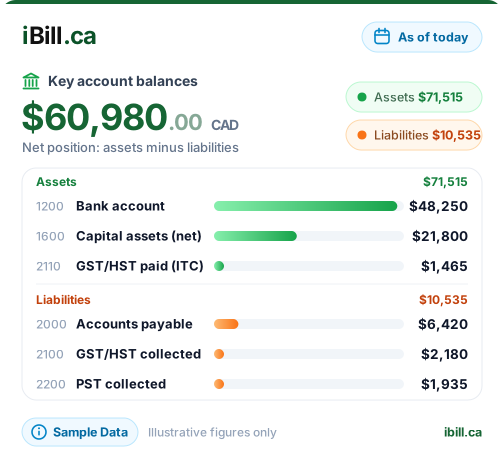
What is a Chart of Accounts?
A chart of accounts is the master list of every financial account in your business. It organizes all your transactions into categories — assets, liabilities, equity, revenue, and expenses — so you can track where your money comes from and where it goes. Proper categorization is the foundation of accurate CRA tax reporting and reliable financial statements.
Master Account List
Every financial account your business uses — from your bank account to revenue to tax liabilities — organized in a single, structured list.
Numbered System (1000-7000)
Accounts follow a standard numbering convention: 1000s for assets, 2000s for liabilities, 3000s for equity, 4000s for revenue, and 5000-7000s for expenses.
Tax Compliance Foundation
Proper account categorization ensures your GST/HST, PST, and QST are tracked accurately — the foundation of correct CRA reporting at tax time.
Auto-Seeded by iBill
No manual setup required. When you first use iBill's accounting features, a complete chart of accounts is automatically created with all standard Canadian business accounts.
iBill's Default Chart of Accounts
A complete, CRA-aligned account structure that is ready to use from day one. Every account is pre-configured for Canadian tax compliance.
- 1100Accounts Receivable
- 1110Allowance for Doubtful Accountscontra
- 1200Bank / Cash
- 1600Capital Assets
- 1610Accumulated Depreciationcontra
- 2100GST/HST Payable
- 2110Input Tax Credits (ITC)
- 2200QST Payable
- 2220PST Payable (non-recoverable)
- 2400Unearned Revenue
- 3000Owner's Equity
- 3100Owner Drawscontra
- 3200Retained Earnings
- 4000Service Revenue
- 4100Other Revenue
- 5000Cost of Goods Sold
- 6000Operating Expenses
- 6600Vehicle Expenses
- 6900Depreciation Expense
Canadian-Specific Accounts
iBill includes dedicated accounts for every Canadian sales tax — so your books are always CRA-ready, no matter which province you operate in.
GST/HST Payable
Tax collected on behalf of the CRA on every taxable sale. This liability account tracks exactly how much GST or HST you owe from your invoices until you remit it.
Input Tax Credits (ITC)
GST/HST paid on business purchases — recoverable from the CRA. Track every dollar of tax paid on eligible expenses to reduce your net tax owing at filing time.
PST Payable
Provincial sales tax for BC, Saskatchewan, and Manitoba. Unlike GST/HST, PST is non-recoverable — it is a real business cost that posts to this separate liability account.
QST Payable
Quebec Sales Tax tracked in its own account, separate from GST. Quebec businesses charge and remit QST independently through Revenu Québec, so it needs its own GL line.
Unearned Revenue
Advance payments received before the work is done. This liability account holds deposits and retainers until you deliver the service and recognize the revenue properly.
Customization Options
iBill's default chart of accounts covers most Canadian businesses. When you need more, customize it to fit your exact needs.
Add Custom Accounts
Create accounts specific to your industry — advertising, subcontractor fees, professional development, or any category your business needs.
Sub-Accounts
Break down broad categories into detailed sub-accounts. Split "Operating Expenses" into rent, utilities, insurance, and office supplies for better visibility.
Five Account Types
Asset, Liability, Equity, Revenue, and Expense. Each new account slots into the right type with the correct normal balance — iBill handles the accounting rules.
Auto-Seeded
Ready to use from day one. iBill creates your full chart of accounts automatically when you first access accounting. Customize only when you need to — not before.
Get Organized — Start with a Professional Chart of Accounts
CRA-aligned accounts, auto-seeded, ready to customize. No accounting degree required.
Get Started NowChart of Accounts FAQs
Ready to organize your business finances with a proper chart of accounts?
Create AccountYour Books, Organized from Day One
Trusted by Canadian businesses using iBill's accounting tools.
Create AccountUnlimited Invoices • CRA-Ready