
GST/HST Filing Deadlines
Your filing deadline depends on your reporting period. Missing the deadline results in penalties and interest charges.
Example: Dec 31 year-end = March 31 deadline
Example: Q1 (Jan-Mar) = April 30 deadline
Example: January = February 28 deadline
If you owe GST/HST, payment is due by the same deadline as your return. Late payments incur interest at the CRA prescribed rate (currently around 9-10% annually).
How to File Your GST/HST Return
Follow these steps to prepare and file your GST/HST return accurately.
Gather Your Records
Collect all sales invoices, purchase receipts, and expense records for the reporting period. With iBill, your invoices and tax amounts are already tracked automatically.
Calculate GST/HST Collected (Line 101)
Add up all GST/HST you charged on sales during the period. This is the tax you collected from customers on behalf of the government.
Calculate Input Tax Credits (Line 106)
Add up all GST/HST you paid on business purchases and expenses. You can claim these back as Input Tax Credits (ITCs).
Determine Net Tax (Line 109)
Subtract your ITCs from GST/HST collected. If positive, you owe the CRA. If negative, you're entitled to a refund.
File Your Return
Submit online via CRA My Business Account (fastest), NETFILE, EDI, or by mail. Pay any amount owing by the deadline.
GST/HST Return Calculator
Use this calculator to estimate your GST/HST return. Enter your totals from the reporting period.
Understanding Input Tax Credits (ITCs)
Input Tax Credits let you recover the GST/HST you paid on business expenses. Here's what qualifies:
Office expenses: Supplies, equipment, furniture
Professional services: Accounting, legal, consulting fees
Vehicle expenses: Gas, repairs, insurance (business portion)
Rent: Commercial rent for your business space
Utilities: Phone, internet, electricity (business portion)
Marketing: Advertising, website hosting, software subscriptions
Personal expenses: Food (unless for clients), personal items
Club memberships: Golf clubs, fitness memberships
Entertainment: 50% limit applies to meals & entertainment
Life insurance: Personal insurance premiums
Exempt supplies: Purchases used to make exempt supplies
To claim ITCs, you need receipts showing: supplier name, GST/HST registration number, date, amount paid, and GST/HST amount. iBill automatically tracks this for your invoiced expenses.
Regular Method vs Quick Method
There are two ways to calculate your GST/HST return. Choose the one that works best for your business.
- Track actual GST/HST collected
- Claim actual ITCs on purchases
- More work but potentially higher refund
- Best if you have significant business expenses
- Required if sales exceed $400K/year
- iBill calculates this automatically
- Remit a percentage of taxable sales
- No tracking of individual ITCs needed
- Simpler but may pay more tax
- Best if few business expenses
- Only for businesses under $400K/year
- Must apply to CRA to use
Most businesses benefit from the Regular Method because they can claim ITCs on expenses. The Quick Method only makes sense if your business expenses are very low (e.g., consulting with no equipment costs).
Late Filing Penalties
Filing or paying late results in penalties and interest. Here's what you'll face:
Late filing penalty: 1% of amount owing + 0.25% for each full month late (up to 12 months)
Example: If you owe $5,000 and file 3 months late:
Penalty = $5,000 × 1% + ($5,000 × 0.25% × 3) = $50 + $37.50 = $87.50
Plus interest: Compounds daily at the CRA prescribed rate on unpaid amounts.
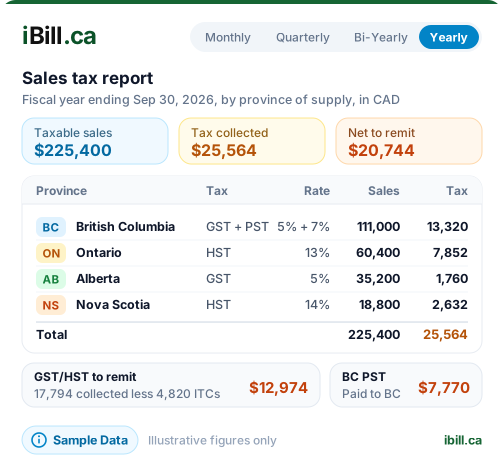
iBill's Tax Reports feature shows you exactly how much GST/HST you've collected and your ITCs for any period. Generate your report before the deadline and stay on top of filing deadlines.
Record Keeping Requirements
The CRA requires you to keep GST/HST records for 6 years from the end of the tax year they relate to.
Sales records: All invoices issued with GST/HST amounts
Purchase records: Receipts for all business purchases with GST/HST
Bank statements: Showing deposits and payments
General ledger: Summary of all transactions
GST/HST returns: Copies of all returns filed
Supporting documents: Contracts, agreements, correspondence
Every invoice you create in iBill is stored with the correct GST/HST amounts. Your financial ledger tracks all transactions, and tax reports can be generated for any period. All records are kept digitally and can be exported anytime.