
Required Elements on Every Canadian Invoice
Whether you are a freelancer, contractor, or small business owner in Canada, your invoices must contain certain elements to be considered valid for CRA purposes and professional for your clients. Missing any of these could delay payment or cause issues during tax audits.
Essential Invoice Elements Checklist
- Your Business Name - Legal business name or registered trade name
- Your Contact Information - Address, phone, email
- Client Name - Full legal name or business name
- Client Contact Information - Address at minimum
- Unique Invoice Number - Sequential numbering recommended
- Invoice Date - Date the invoice was issued
- Description of Goods/Services - Clear, specific descriptions
- Quantities and Rates - Unit price and quantity for each item
- Subtotal - Total before taxes
- Tax Amounts - GST/HST/PST/QST shown separately
- Total Amount Due - Final amount including all taxes
1. Your Business Name and Contact Information
Every invoice must clearly identify who is issuing it. Include your:
- Legal business name or trade name registered with your province
- Full mailing address including city, province, and postal code
- Phone number for client inquiries
- Email address for correspondence
- Website (optional but recommended)
2. Client Name and Contact Information
Clearly identify who the invoice is for. At minimum include:
- Client's legal name or business name
- Client's billing address
- Contact person name (for businesses)
- Client email (optional but helpful for records)
3. Invoice Number and Date
CRA requires each invoice to have a unique identifier. Best practices include:
- Sequential numbering (e.g., INV-001, INV-002, INV-003)
- Include the year for easier tracking (e.g., 2026-001)
- Never reuse invoice numbers
- Invoice date should be the date you issue the invoice
4. Description of Goods or Services
Clear descriptions are essential for both CRA compliance and client clarity:
- Be specific about what was provided (avoid vague terms like "services rendered")
- Include service dates or delivery dates when applicable
- Reference project names or purchase order numbers if relevant
- List each service or product as a separate line item
5. Quantities and Rates
For each line item, include:
- Quantity: Number of units, hours, or items
- Unit price: Rate per hour, per item, or per project
- Line total: Quantity multiplied by unit price
6. Subtotal, Taxes, and Total
The financial section must be clearly organized:
- Subtotal: Sum of all line items before tax
- Tax amounts: Each tax shown as a separate line (GST, HST, PST, QST)
- Total due: Final amount the client owes
- Currency: Specify CAD for Canadian dollars
- Capital asset purchases: If billing for equipment, note that the buyer may be eligible for CCA depreciation deductions
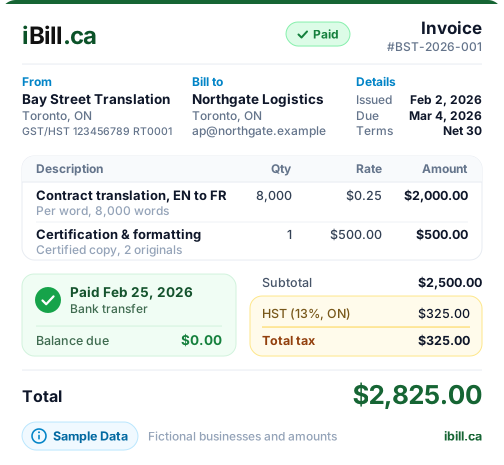
GST/HST Registration Requirements
If your business is registered for GST/HST, your invoice must include your registration number. This is mandatory for businesses earning over $30,000 annually.
GST/HST Registration Number Rules
- Format: 15-character number (e.g., 123456789RT0001)
- Display prominently on the invoice, typically in the header
- Required for clients to claim input tax credits
- Show taxes separately - never combine into the price
Tax rates by province:
- GST only (5%): Alberta, BC (with PST), Manitoba (with PST), Saskatchewan (with PST), NWT, Nunavut, Yukon
- HST (13%): Ontario
- HST (15%): New Brunswick, Newfoundland and Labrador, Prince Edward Island
- HST (14%): Nova Scotia
- GST + QST: Quebec (5% GST + 9.975% QST, both calculated on subtotal)
Payment Terms and Due Date
Clear payment terms help ensure you get paid on time and reduce confusion.
-
Due Date
Specify when payment is expected. Common terms include:- Due on Receipt - payment expected immediately
- Net 15 - payment due within 15 days
- Net 30 - payment due within 30 days (most common)
- Net 60 - payment due within 60 days
-
Early Payment Discounts (Optional)
Encourage faster payment with terms like "2/10 Net 30" (2% discount if paid within 10 days, otherwise due in 30 days). -
Late Payment Policies
State any interest charges or late fees (e.g., "1.5% monthly interest on overdue balances"). Check provincial regulations for maximum allowable rates.
Accepted Payment Methods
Make it easy for clients to pay by clearly listing your accepted payment methods and providing necessary details:
- Interac e-Transfer: Include the email address to send payment to
- Cheque: Provide your business name and mailing address for cheque payments
- Credit Card: Note if you accept credit cards and any associated fees
- Bank Transfer/EFT: Include bank name, transit number, institution number, and account number (or provide separately for security)
- Online Payment Links: If you use payment processors, include the link
Optional But Recommended Elements
These elements are not required but can enhance professionalism and reduce disputes:
- Company Logo: Builds brand recognition and trust
- Purchase Order (PO) Number: If the client provided one, reference it for their accounting
- Project Name or Reference: Helps clients match invoices to projects
- Service Period: Date range when services were performed
- Notes or Thank You Message: Personal touch (keep it brief and professional)
- Terms and Conditions: Link to or include relevant terms
- Your Website or Social Media: Additional branding opportunity
- QR Code for Payment: Modern convenience for quick mobile payments
What NOT to Include on an Invoice
Keep your invoices professional by avoiding these common mistakes:
- Personal information unrelated to the transaction (SIN, personal bank accounts)
- Emotional language or threats about non-payment
- Excessive personal details about the client beyond billing info
- Inaccurate tax calculations - always double-check
- Vague descriptions like "various services" or "as discussed"
- Unprofessional graphics or distracting design elements
- Incorrect business name or outdated contact information
- Hidden fees not previously discussed with the client
Quick Reference Checklist Summary
Required
- Your business name and address
- Client name and address
- Unique invoice number
- Invoice date
- Description of goods/services
- Quantities and unit prices
- Subtotal, taxes, and total
- GST/HST number (if registered)
Recommended
- Due date and payment terms
- Accepted payment methods
- Company logo
- PO number (if applicable)
- Service period dates
- Notes or thank you
- Late payment policy
Avoid
- Personal SIN or ID numbers
- Emotional or threatening language
- Vague service descriptions
- Wrong tax calculations
- Hidden or undisclosed fees
- Outdated contact information
- Unprofessional design