
What Is Cash Basis Accounting?
Cash basis accounting is a method where you record revenue when you actually receive payment and expenses when you actually pay them. It does not matter when the invoice was sent or when the bill arrived — what matters is when money changes hands.
The other main method is accrual basis, where revenue is recorded when an invoice is issued (regardless of whether the client has paid) and expenses are recorded when the bill is received (regardless of whether you have paid it).
Cash Basis vs Accrual Basis
The two main accounting methods differ in when income and expenses are recognized:
| Cash Basis | Accrual Basis | |
|---|---|---|
| Revenue recognized | When payment is received | When invoice is sent |
| Expenses recorded | When payment is made | When bill is received |
| Matches bank account? | Yes — your books match your bank balance | No — books may show income you haven't collected |
| Tax impact | You don't pay tax on unpaid invoices | You may owe tax on invoiced but uncollected revenue |
| Complexity | Simpler | More complex |
| Filing eligibility | Available only to farmers, fishers and self-employed commission agents (CRA) | Generally required for business income (CRA) |
How iBill Displays Your Books
Your iBill dashboard counts revenue when you issue an invoice, including invoices not yet paid. The Profit and Loss report shows revenue when payment is received. Sales-tax reports follow the timing rule in section 168 of the Excise Tax Act: tax is reported on the earlier of the invoice date or the payment date. The CRA generally requires business income to be reported on an accrual basis; only farmers, fishers and self-employed commission agents may use the cash method. Your tax preparer determines how your income is reported. This means:
- Your dashboard shows what you have billed. An invoice counts as revenue on the dashboard once it is issued, whether or not the client has paid.
- What is still unpaid appears separately in the "Owing" metric, so you always know what is outstanding.
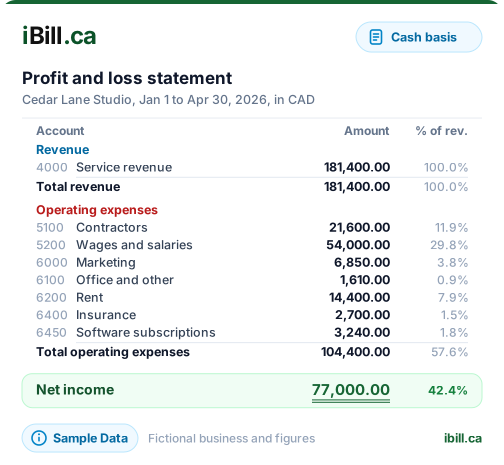
- Your Profit and Loss report shows what you have collected. It counts revenue only when payment is received, so its revenue and net income will be lower than the dashboard while invoices are unpaid.
How iBill Calculates Sales Tax (GST/HST/PST/QST)
Sales-tax reports follow the timing rule in the Excise Tax Act, section 168: GST/HST is owing on the earlier of the day the invoice is issued or the day payment is received. The same timing applies to provincial sales tax in BC, Saskatchewan, and Manitoba, and to QST in Quebec.
This timing applies to your sales-tax remittance reports regardless of how your dashboard displays revenue. Your tax preparer reviews the remittance summary iBill produces before filing.
Try iBill
Invoicing with automatic GST/HST/PST/QST calculations per Excise Tax Act s.168 timing.
Create AccountUnderstanding Your iBill Dashboard
Your dashboard gives you a real-time financial overview of your business. Here's what each metric means and how it is calculated:
YTD Net Revenue
Total revenue billed from January 1 to today. This is the sum of the subtotals, before tax, of every invoice you have issued, including invoices not yet paid. Drafts are not counted. Your Profit and Loss report counts only paid invoices.
YTD Sales Tax
Total GST/HST/PST/QST on your invoices year-to-date, reported on the earlier of the invoice date or the payment date. This is not your revenue — it is money you hold in trust for Canada Revenue Agency and must remit. Useful when filing your quarterly or annual return. Sales-tax remittance reports follow the Excise Tax Act s.168 timing rule (earlier of invoice date or payment date), the same timing the dashboard tax tile uses.
YTD Expenses
Total business expenses you have logged — supplies, mileage, subscriptions, software, fuel, phone bills, and more. The more you track here, the more accurate your profit picture becomes.
YTD Net Profit
Revenue minus expenses. If your expenses are not entered, this number will look inflated — it is only as accurate as the data you provide. Enter expenses to see your true bottom line.
Owing
The total outstanding balance across all unpaid invoices — what your clients owe you right now. The dashboard already counts these invoices as revenue; the Profit and Loss report counts them only once they are paid.
Monthly Invoices Created
The number of invoices you created in the current calendar month. Shows the actual month name (e.g., "March") so you always know which period you are looking at.
Monthly Performance
Compares this month's paid revenue to last month's, with a growth percentage. Shows exact date ranges (e.g., "Mar. 1 – Mar. 15" vs "Feb. 1 – Feb. 28") so you know the comparison window. Starts at $0 on the first day of each month and grows as payments come in.
Why Taxes Are Not Revenue
A common source of confusion: if you invoice a client $1,000 plus 5% GST ($50), your revenue is $1,000, not $1,050. The $50 GST is a liability — money you collected on behalf of Canada Revenue Agency and must remit.
iBill handles this correctly by always using subtotals (before tax) for all revenue calculations. Tax amounts flow to your YTD Sales Tax metric instead, keeping your revenue figures clean and consistent with Canada Revenue Agency's published guidance on remittance.
Two Actions to Keep Your Numbers Accurate
Keep Your Dashboard Honest
1. Mark paid invoices as "Paid"
If a client has paid you but the invoice still shows as unpaid, your Owing balance will be overstated and your Profit and Loss report will be understated. Go to Invoices, click the invoice, and update its status to Paid. This is the single most impactful action for accurate financials.
2. Log your business expenses
Go to Expenses and add your recurring costs — office supplies, software subscriptions, fuel, phone bills, insurance. This gives you a true Net Profit figure and provides valuable data at tax time. You can attach receipt photos for record-keeping consistent with Canada Revenue Agency's documentation guidance.