
Accounts Receivable Aging — Know Who Owes You
Every unpaid invoice sorted into 30/60/90/120+ day buckets automatically. See which clients are overdue and prioritize your collections at a glance.
AR Aging in 10 Seconds
Create an invoice with a due date. iBill tracks it. Once overdue, the invoice moves into the correct aging bucket (30, 60, 90, or 120+ days). You see every client, every amount, and exactly how late each payment is.
Example: $5,000 invoice due Jan 15 on Mar 15 it appears in the "61–90 days" bucket
What is Accounts Receivable Aging?
An AR aging report groups your unpaid invoices by how long they have been outstanding, so you can see who owes you and how overdue they are.
Current (0–30 Days)
Invoices that are still within their normal payment terms. These are not yet overdue. Most clients pay within this window, especially with Net 30 terms. No follow-up action is typically needed for current receivables.
31–60 Days Past Due
Invoices that are one month overdue. A polite payment reminder is usually sufficient at this stage. iBill can send automatic reminders to nudge clients. This bucket often represents clients who simply forgot or had a processing delay.
61–90 Days Past Due
Invoices that are two months overdue require more direct follow-up. At this stage, consider a phone call or formal collection letter. The longer a receivable sits here, the lower the probability of collection.
91–120+ Days Past Due
Seriously delinquent accounts. These may require escalated collection action, negotiated payment plans, or evaluation for bad debt write-off. Under ITA Section 20(1)(p), you may be able to deduct bad debts if you can demonstrate the debt is uncollectable.
AR Aging Report Features
Everything you need to track receivables and prioritize collections — auto-calculated from your invoices
30/60/90/120+ Day Buckets
Every unpaid invoice is automatically sorted into standard aging buckets based on days past due date. You see at a glance how much is current, slightly overdue, or seriously delinquent — the same format your accountant and bank expect.
Client-by-Client Breakdown
See each client's total outstanding balance broken down by aging bucket. Instantly identify which clients are consistently slow payers and which accounts need the most attention. Drill down to see individual invoices for any client.
Overdue Highlighting
Invoices that are past due are visually highlighted so overdue accounts stand out. Color-coded aging buckets make it easy to spot the most urgent receivables — green for current, yellow for 31–60, orange for 61–90, red for 91+ days.
Auto-Calculated from Invoices
No manual data entry or spreadsheet formulas. Every invoice you create in iBill is automatically tracked. When a due date passes without payment, the invoice moves into the correct aging bucket in real time. The report is always up to date.
Export to PDF & Excel
Export your AR aging report to PDF for meetings with your accountant or banker, or to Excel for custom analysis. Both formats include the full client-by-client breakdown with aging buckets, totals, and date ranges.
Collection Priority Tracking
Focus your collection efforts where they matter most. The report ranks clients by total overdue amount and days past due, so you contact the highest-value, most-overdue accounts first. Paired with iBill's payment reminders for automated follow-up.
Track Every Receivable Automatically
Every invoice you create feeds your AR aging report in real time. No spreadsheets, no manual tracking.
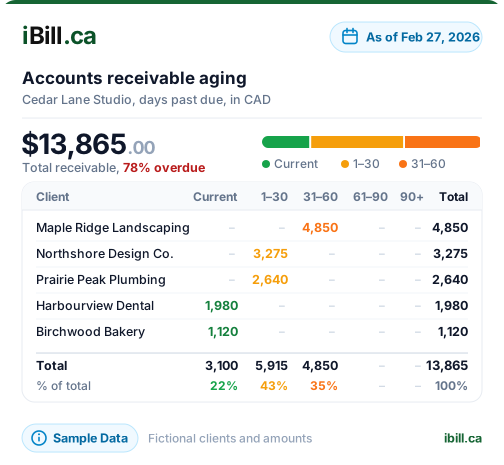
Get Started NowAR Aging Report Example
A sample aging report showing how unpaid invoices are grouped by days past due
Sample Business — AR Aging Report
As at March 7, 2026
Collection priority: Northern Web Design ($8,900 at 91–120 days) should be contacted first — this is the highest-value, most-overdue receivable. Prairie Electric's 61–90 day invoice ($4,100) is next. iBill ranks clients automatically so you focus where it matters.
How to Use AR Aging for Collections
A practical guide to turning your aging report into collected cash
Step 1: Review Weekly
Check your AR aging report at least once a week. Look for invoices that have moved into a new bucket since your last review. Catching overdue invoices early dramatically improves your chances of collecting — industry data shows collection probability drops below 70% after 90 days.
Step 2: Start with the Oldest
Work from right to left on your aging report. Contact 120+ day accounts first, then 91–120, then 61–90. These are the accounts most at risk of becoming uncollectable. A phone call is more effective than email for overdue accounts past 60 days.
Step 3: Send Payment Reminders
For 31–60 day accounts, use iBill's built-in payment reminder feature to send a polite follow-up automatically. Most clients in this bucket simply forgot or had an administrative delay. A friendly reminder is usually all it takes to get paid.
Step 4: Document Everything
If you eventually need to write off a bad debt, the CRA requires documentation that you attempted to collect. Your AR aging report history, combined with iBill's audit trail of sent reminders and communications, provides the evidence you need for a bad debt deduction under ITA s.20(1)(p).
Accounts Receivable Aging FAQs
Ready to see exactly who owes you and how overdue they are?
Create AccountTrack Every Receivable Automatically
Trusted by Canadian businesses using iBill's AR aging report.
Create AccountUnlimited Invoices • CRA Audit-Ready