
CRA Tax Reporting Software — GST/HST/QST Reports in One Click
Generate CRA-ready tax summaries directly from your general ledger. Excise Tax Act s.168 timing with automatic province detection — no spreadsheets needed.
What the CRA Expects From Your Business
Understanding CRA reporting requirements is the first step to staying ready and avoiding penalties
Accurate GST/HST Reporting
The CRA requires every registrant to report GST/HST collected and input tax credits (ITCs) claimed. Your return must reconcile with your books. iBill generates these figures directly from your general ledger journal entries, ensuring your numbers are always audit-ready.
ETA s.168 Sales Tax Timing
iBill follows the Excise Tax Act s.168 rule for GST/HST: tax is recognized on the earlier of the invoice date or the payment date. Voided invoices reverse at the void date. Your tax preparer determines which filing basis (cash or accrual) applies to your filing.
Filing Deadlines
Quarterly filers (annual revenue over $1.5M) must file within one month of each quarter end. Annual filers (most small businesses) file within three months of their fiscal year-end. iBill keeps your data up to date so you are always ready when a deadline arrives.
Penalties for Errors
Late or incorrect GST/HST filings can result in penalties of 1% of the amount owing plus 0.25% per month, up to 12 months. Interest compounds daily. Using iBill's automated reporting from your GL data reduces errors and helps you file on time.
Province-Specific Tax Reporting
iBill auto-detects your client's province and applies the correct tax treatment for each jurisdiction
Ontario
British Columbia
Alberta
Saskatchewan
Manitoba
Atlantic Canada
Key Tax Report Types
Every report pulls data directly from your general ledger journal entries. No manual calculations, no guesswork. iBill gives you the exact figures you need for every tax jurisdiction your business operates in.
GST/HST Summary
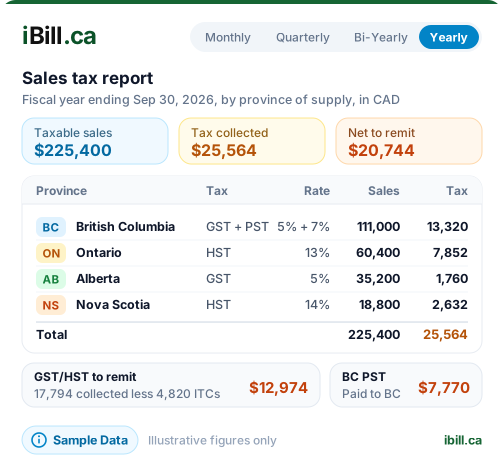
Lines 101, 105, 108, and 109 for your CRA return. Total sales and revenue, GST/HST collected, ITCs claimed, and your net tax owing or refund — all calculated from your GL.
QST Summary
Separate GST and QST breakdown for Revenu Québec. QST calculated on the subtotal only (post-2013 rules), not compounded on GST. Ready for your QST return filing.
PST/RST Summary
Provincial sales tax collected in BC, Saskatchewan, and Manitoba. Tracked separately from GST in your ledger so you can file with your provincial revenue authority independently.
Tax Collected by Period
Monthly, quarterly, or annual breakdown of all tax collected. Filter by date range, province, or tax type. See exactly how much you owe for any filing period at a glance.
Input Tax Credit (ITC) Report
GST/HST paid on your business expenses, tracked as ITCs in your GL. Claim back the tax you paid on eligible purchases and reduce your net remittance to the CRA at filing time.
Year-End Tax Package
Complete annual summary for accountant handoff. Tax collected, ITCs claimed, net tax owing, and supporting GL detail — all in one exportable package for seamless year-end preparation.
Generate Your First Tax Report in Minutes
CRA-ready GST/HST summaries pulled directly from your general ledger, with Excise Tax Act s.168 timing.
Create AccountHow iBill Generates Tax Reports
Real data from your general ledger — not estimates or manual entry
-
1
Reports Pull From GL Journal Entries
Every tax report is generated from your actual double-entry journal entries. No separate data entry, no spreadsheets. Your GL is the single source of truth for every tax figure in your reports.
-
2
ETA s.168 Timing for Sales Tax
iBill recognizes GST/HST on the earlier of the invoice date or the payment date, exactly as the Excise Tax Act s.168 rule requires. Voided invoices reverse at the void date. Filing basis (cash or accrual) is determined by your tax preparer.
-
3
Province Auto-Detected From Invoice Data
iBill reads the province from each invoice and applies the correct tax treatment automatically. Ontario invoices get 13% HST. Quebec invoices get separate GST and QST. BC invoices get separate GST and PST. No manual province selection needed.
-
4
Tax Collected vs ITCs vs Net Tax Owing
Your report shows three key figures: total tax collected on sales, total ITCs claimed on expenses, and the net difference — which is what you owe or what the CRA owes you. These are the exact numbers for lines 105, 108, and 109 of your GST/HST return.
-
5
One-Click Export to CSV or Excel
Export any report with a single click. Your accountant gets a clean, formatted summary they can work with immediately. No copying and pasting from screens, no formatting errors. Professional output every time.
CRA Tax Reporting FAQs
Ready to simplify your CRA tax reporting?
Create AccountStay CRA-Ready Without the Complexity
Trusted by Canadian businesses using iBill's tax reporting tools.
Create AccountUnlimited Invoices • CRA-Ready