
Client records that do the invoicing work
Enter a client once: who gets the invoice, which province they're in and the currency they pay in. Every invoice, quote and reminder for that client uses it, and a statement shows where the account stands.
Free · No credit card · All features included
How it works
Add the client
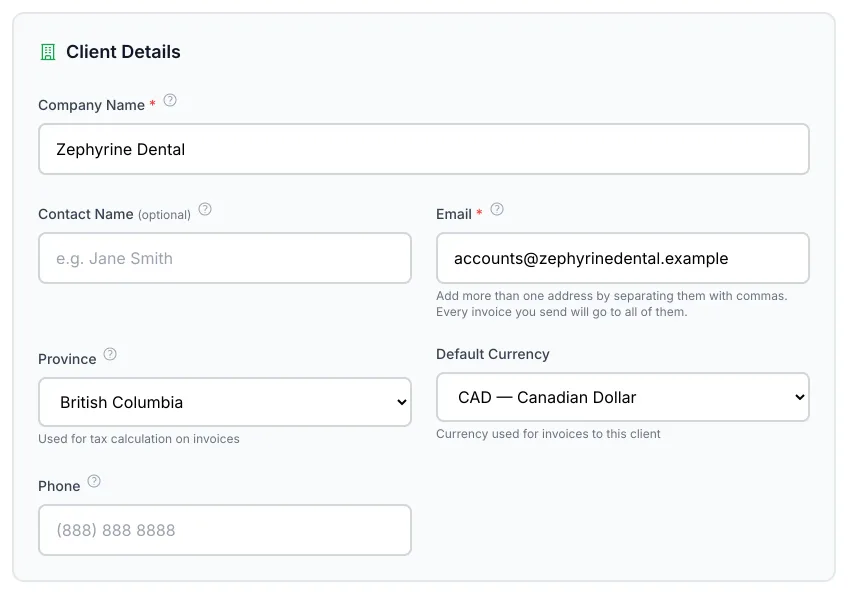
Add Client: company name, contact, email, province and default currency. More details holds notes, a client ID and the vendor setting.
Or import your list
Import a CSV or Excel file of up to 500 clients with the template provided. Clients already in iBill are reported, not overwritten.
Use it everywhere
Pick the client on an invoice or quote and the province, currency and email fill in. Open a statement of account to see invoices, payments and the balance.
Worked example: one client record and what it decides
An IT consultant in Alberta sets up a client in Toronto that wants invoices sent to two people.
| Field | Entered | What it does |
|---|---|---|
| ap@northlake.example, cfo@northlake.example | Every invoice and reminder goes to both. Up to five addresses. | |
| Province | Ontario | Invoices for this client get HST at the Ontario rate, 13% HST, not Alberta's GST. |
| Default currency | CAD | New invoices and quotes start in Canadian dollars; choose USD, EUR or GBP for clients who pay in those. |
| Statement of account | September 1 to 30 | Opening balance, invoices, payments, credits and the running balance, as a PDF or emailed to the client. |
Change the province on a single invoice when the work happened somewhere else, for example a job at the client's Alberta site. The client record stays as it is for the next invoice.
Why the client's province matters
Sales tax on most services follows the client's province, not yours. Setting the province on the client record once means every invoice to them starts with the right tax, so an Alberta business billing an Ontario client charges HST without looking it up. You can still change it on an invoice when the work was done somewhere else.
When a client relationship ends, deactivate the client rather than deleting them. Their invoices stay on record, their active recurring schedules pause and their portal links stop working, all in one step. Reactivating them doesn't restart the schedules; resume those yourself.
When you save a client, iBill tidies the email list: spaces are trimmed and an address typed twice is kept once. On import, a client whose company name is already in iBill is listed for you to check instead of being added a second time.
What’s included, and what isn’t
- Up to five email addresses per client, separated by commas or semicolons, 255 characters in all.
- Each client can be marked as a vendor too, for vendor bills and purchase orders.
- Export your client list to CSV at any time.
- Statements can cover a date range or all activity, with totals in each currency.
- Revoke a client's portal links without deactivating them.
- Not included: separate contact records with their own details, client logins, and sales pipeline or CRM features.
Questions
Can I import my clients?
Can I send invoices to more than one person?
Can I send a client a statement?
Can a client be a vendor too?
Related
Set up your clients once
Import your list and start invoicing with the right tax. See the other invoicing features.
Start freeFree · No credit card · All features included · Join 1,200+ Canadian Businesses