
Accounts Payable Software — Track Vendor Bills & Payments
Track vendor bills, record payments, view AP aging reports, and auto-post everything to your general ledger. GST/HST Input Tax Credit tracking included.
What is Accounts Payable?
Accounts payable is the money your business owes to vendors and suppliers for goods and services received but not yet paid for
Bill Entry
Record vendor bills as they arrive with the vendor name, invoice number, amount, due date, and expense category. Each bill is tracked individually so nothing slips through the cracks, and overdue items are flagged automatically.
Payment Recording
Record full or partial payments against any outstanding vendor bill. Each payment creates a journal entry that debits Accounts Payable and credits your bank account, keeping your books balanced in real time without manual data entry.
AP Aging
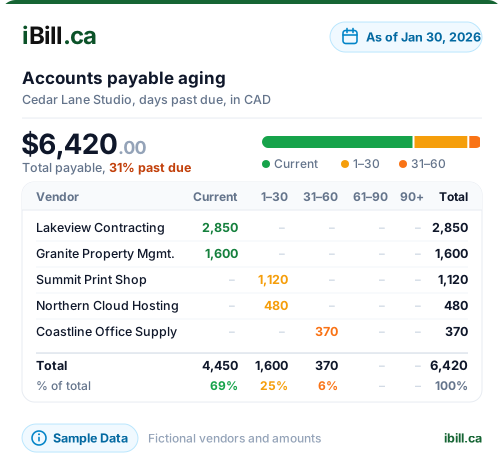
See exactly what you owe and when it is due with aging buckets for current, 30, 60, and 90+ days. The AP aging report helps you prioritize payments, manage cash flow, and avoid late fees or strained vendor relationships.
Partial Payments
Not every bill gets paid in full at once. iBill tracks partial payments against each vendor bill, updating the outstanding balance automatically. You always know the exact remaining amount for every open bill across all your vendors.
GL Auto-Posting
Every vendor bill and payment automatically generates the correct journal entries in your general ledger. Bill entry debits the expense account and credits AP (2200). Payment reverses the AP balance and credits your bank account (1200).
ITC Recovery
GST and HST paid on vendor bills are recoverable as Input Tax Credits when you file your return with the CRA. iBill separates recoverable GST/HST (account 2110) from non-recoverable provincial sales tax (account 2220) automatically.
AP Tracking at a Glance
See how iBill compares to tracking vendor bills manually with spreadsheets or paper
| Feature | Manual Tracking | iBill |
|---|---|---|
| Bill Entry | Spreadsheet or paper filing | Digital with auto GL posting |
| Payment Recording | Manual ledger update | One-click with journal entry |
| AP Aging Report | Calculate manually each month | Real-time 30/60/90 day view |
| Partial Payments | Track remaining balance by hand | Auto-updated per payment |
| GL Integration | Separate bookkeeping step | Automatic journal entries |
| GST/HST ITC Tracking | Tally receipts at tax time | Separated automatically (2110/2220) |
| Vendor History | Search through files or folders | Full ledger per vendor |
| CRA Audit Readiness | Gather documents under pressure | Always organized and exportable |
How iBill Handles Accounts Payable
From vendor bill entry to payment and reporting — everything is tracked and posted to your GL automatically
Vendor Bill Creation
Enter vendor bills with all the details: vendor name, invoice number, amount, due date, expense category, and applicable taxes. Each bill is stored with a complete audit trail from entry to final payment.
Payment Recording
Record full or partial payments against any outstanding bill. Each payment generates a journal entry that debits AP (2200) and credits your bank account (1200). Partial payments update the remaining balance automatically.
AP Aging Report
View all outstanding vendor bills in aging buckets: current, 30 days, 60 days, and 90+ days overdue. Prioritize which vendors to pay first and maintain healthy supplier relationships while managing your cash flow.
GL Integration
When you enter a vendor bill, iBill debits the expense account (e.g., 5000 Office Supplies) and credits Accounts Payable (2200). When you pay, it debits AP and credits Bank (1200). Your general ledger stays balanced automatically.
GST/HST ITC Tracking
Recoverable GST and HST on vendor bills are posted to account 2110 (Input Tax Credits). Non-recoverable provincial taxes like BC PST or Saskatchewan PST go to account 2220. This separation ensures accurate CRA tax reporting.
Vendor Ledger
View the complete payment history for any vendor in one place: every bill, every payment, every outstanding balance. Export vendor ledger data for year-end reporting or CRA audit requests with a single click.
Stop Losing Track of Vendor Bills
Enter bills, record payments, and view AP aging reports with automatic GL posting.
Get Started NowAccounts Payable FAQs
Ready to take control of your vendor bills and AP tracking?
Create AccountManage Every Vendor Bill in One Place
Trusted by Canadian businesses using iBill's accounts payable tools.
Create AccountUnlimited Invoices • CRA-Ready