
Generate Financial Statements Automatically — Balance Sheet, Income Statement & Trial Balance
Real-time financial reports powered by your general ledger. No manual spreadsheets, no month-end closing — just accurate numbers when you need them.
Three Core Financial Statements
Every statement is generated automatically from your double-entry general ledger — always balanced, always current
Balance Sheet
A snapshot of your business at any point in time. See exactly what you own, what you owe, and your net worth. iBill organizes your balance sheet into three sections with proper account groupings, including contra-accounts that reduce parent balances for accurate reporting.
Assets (1000-series) — what your business owns
Liabilities (2000-series) — what your business owes
Equity (3000-series) — your ownership stake
Income Statement (Profit & Loss)
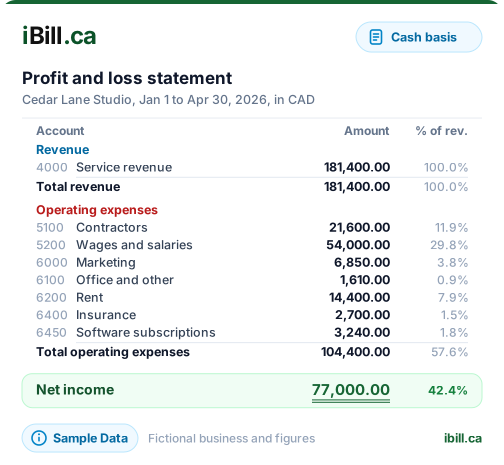
See how your business performed over any period. Revenue minus expenses equals your bottom line. iBill's Profit and Loss report shows revenue when payment is received; your dashboard shows billed work, including unpaid invoices, alongside it.
Revenue (4000-series) — income recognized when payment is received (cash basis)
Expenses (5000-7000 series) — cost of goods sold, operating expenses, vehicle costs, depreciation
Shows gross profit, total operating expenses, and net income for any date range you choose. Compare month-over-month or year-over-year to track your business trajectory.
Trial Balance
The trial balance lists every account in your chart of accounts with its current debit or credit balance. It verifies that total debits equal total credits across your entire general ledger — the fundamental check that your books are in balance.
If debits and credits do not match, you know there is an entry error to investigate before it compounds into larger discrepancies. Run a trial balance at any time to confirm your books are clean and audit-ready.
Why Financial Statements Matter
Your financial statements are more than just numbers — they are decision-making tools
CRA Audit Readiness
Have your books in order before CRA asks. Accurate financial statements backed by journal entries provide a clear audit trail that satisfies CRA requirements.
Bank Loan Applications
Lenders require current financial statements to assess creditworthiness. Generate a balance sheet and income statement on demand for any lending institution.
Business Valuation
Know what your business is worth. Financial statements provide the foundation for valuation, whether you are planning to sell, seek investors, or measure growth.
Tax Planning
Optimize deductions and timing with clear financial data. See your income and expenses in real time so you can make informed decisions before year-end.
Key Capabilities
Powerful reporting tools that work automatically — no accounting degree required
Real-Time Generation
No month-end close needed. Your financial statements are always current, reflecting every journal entry the moment it is recorded in your general ledger.
Date Range Filtering
Generate statements for any period — monthly, quarterly, annual, or custom. Pick the exact date range that matches your reporting needs.
Drill-Down Detail
Click any line item on your balance sheet or income statement to see the underlying journal entries. Trace every dollar back to its source transaction.
Export to PDF / Excel
Share professional financial statements with your accountant, bank, or business partners. Export to PDF for formal submissions or Excel for further analysis.
Comparative Periods
View two periods side by side to spot trends. Compare this quarter versus last quarter, or this year versus last year, to measure progress at a glance.
CCA Integration
Capital cost allowance depreciation is automatically reflected in your financial statements. Asset values, accumulated depreciation, and expense impact — all in sync.
See Your Financial Picture in Real Time
Balance sheet, income statement, and trial balance — generated automatically from your general ledger. Always accurate, always
Get Started NowFinancial Statements FAQs
Ready to see your business numbers clearly?
Create AccountKnow Your Numbers — Without the Accounting Degree
Trusted by Canadian businesses using iBill's financial reporting tools.
Create AccountUnlimited Invoices • CRA-Ready